Knights of Satoshi
Getting your parish set up: a step-by-step guide
How a parish, school, or Catholic organization creates its giving page and links its Strike account — what you will be asked for, and what happens at each step.
Before you start
Onboarding takes about ten minutes. Have these ready:
- Your organization's legal name and EIN (federal tax ID) — the legal name appears on donor receipts, and the EIN is used to confirm your parish.
- Your city and state — they become part of your page's address.
- Someone with authority to accept the Terms of Service on the organization's behalf. The Terms include authorizing Knights of Satoshi to email each donor a receipt in your parish's name.
- Proof of tax-exempt status. A parish or school covered by the group ruling of the United States Conference of Catholic Bishops provides one letter from its diocese confirming good standing and current listing in the Official Catholic Directory. An organization with its own IRS determination letter provides no document — Knights of Satoshi confirms its EIN against IRS Tax Exempt Organization Search records before the page goes live.
- A one-sentence mission line and a short story about your parish for your public page.
- A logo and a cover photo (PNG or JPG). Optional — you can add them later.
- A Strike business account, or the details to create one: parish name and address, EIN, incorporation details, and a photo ID for each person who owns or operates the account. Connecting it is required before you can continue past step 2.
Part 1 — Create your account
From the homepage, open For parishes and choose to get started, or go straight to Sign in. Enter your email address — for example, admin@avemariaparish.org — and Knights of Satoshi sends you a one-time code. Enter the code and you are signed in. You will sign in the same way every time.
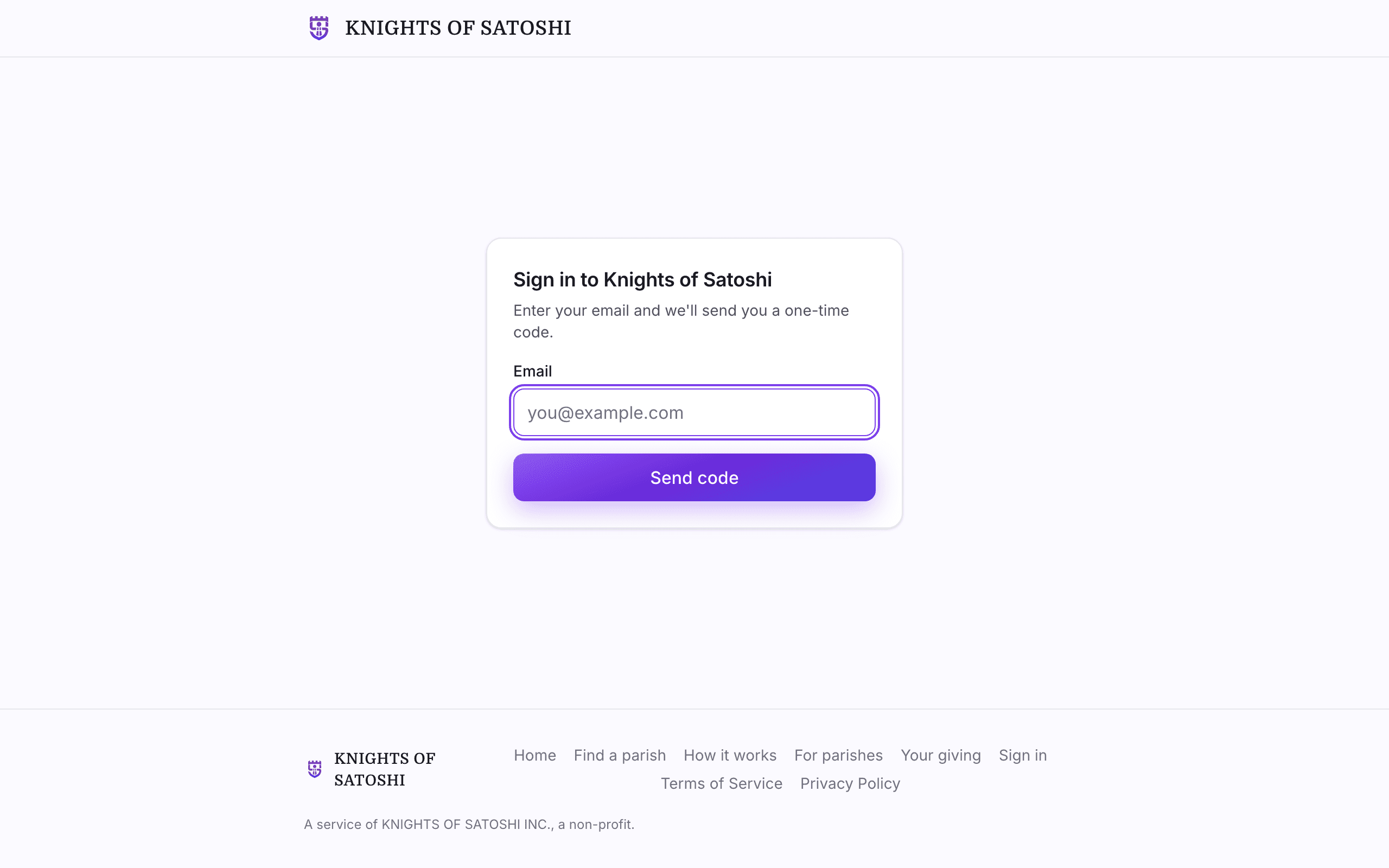
First-time organization admins land in the onboarding wizard automatically.
Part 2 — The onboarding wizard
Four short steps. A live preview shows your public page taking shape as you type — you can step away and pick up where you left off.
Step 1 — Tell us about your parish
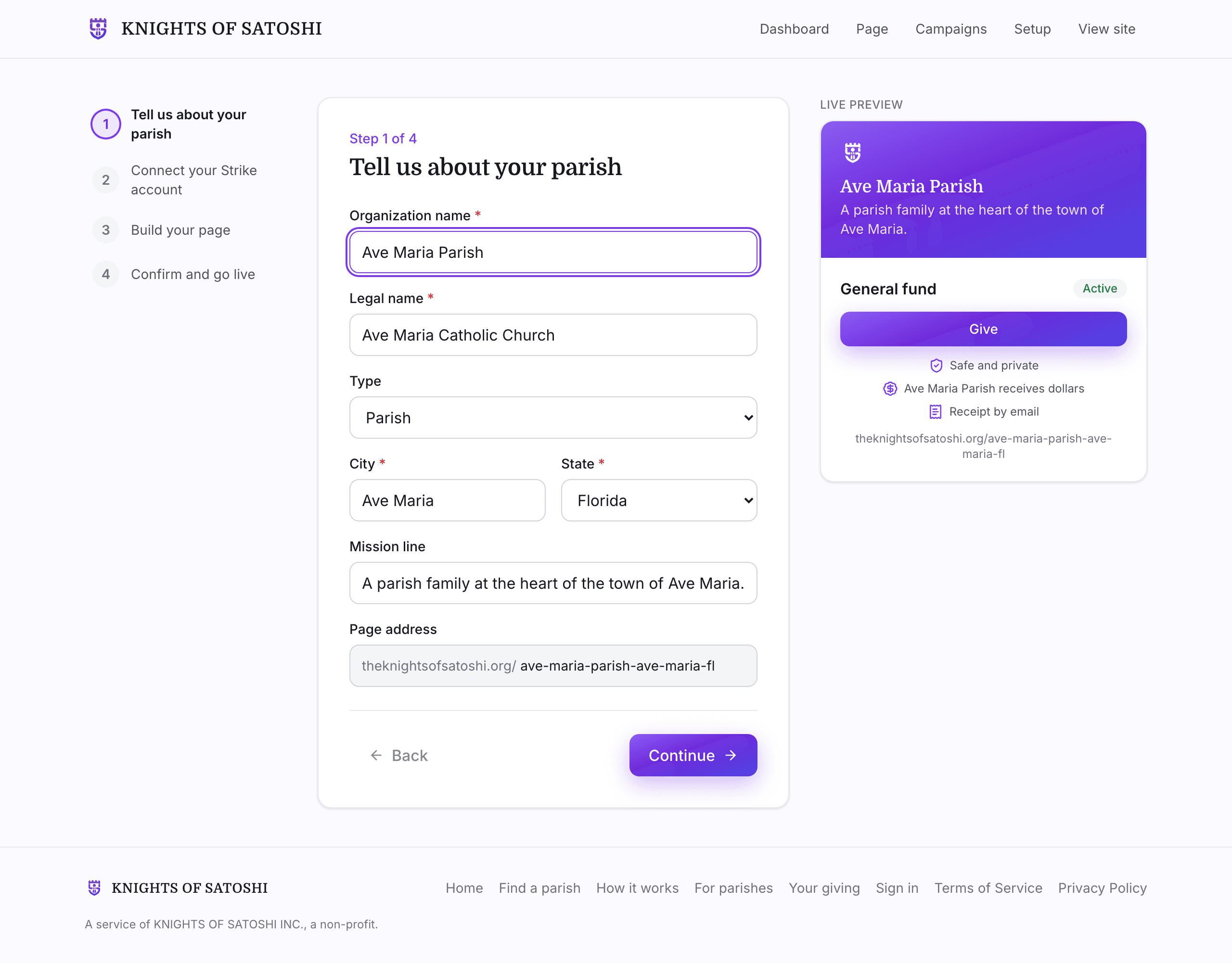
| Field | Required | Example | Notes |
|---|---|---|---|
| Organization name | Yes | Ave Maria Parish | The display name on your page. |
| Legal name | Yes | Ave Maria Catholic Church | As registered with the IRS — used on receipts. |
| Type | No | Parish | Parish, school, or other Catholic organization. |
| City | Yes | Ave Maria | Part of your page's address. |
| State | Yes | FL | |
| Mission line | No | A parish family at the heart of the town of Ave Maria. | One sentence under your name. |
| Page address | Auto | theknightsofsatoshi.org/ave-maria-parish-ave-maria-fl | Generated from your name, city, and state. |
Many parishes share a name, so your city and state are part of your page address. If two organizations still end up with the same address, Knights of Satoshi adds a short number to the newer one, and every parish keeps its own page.
Step 2 — Connect your Strike account
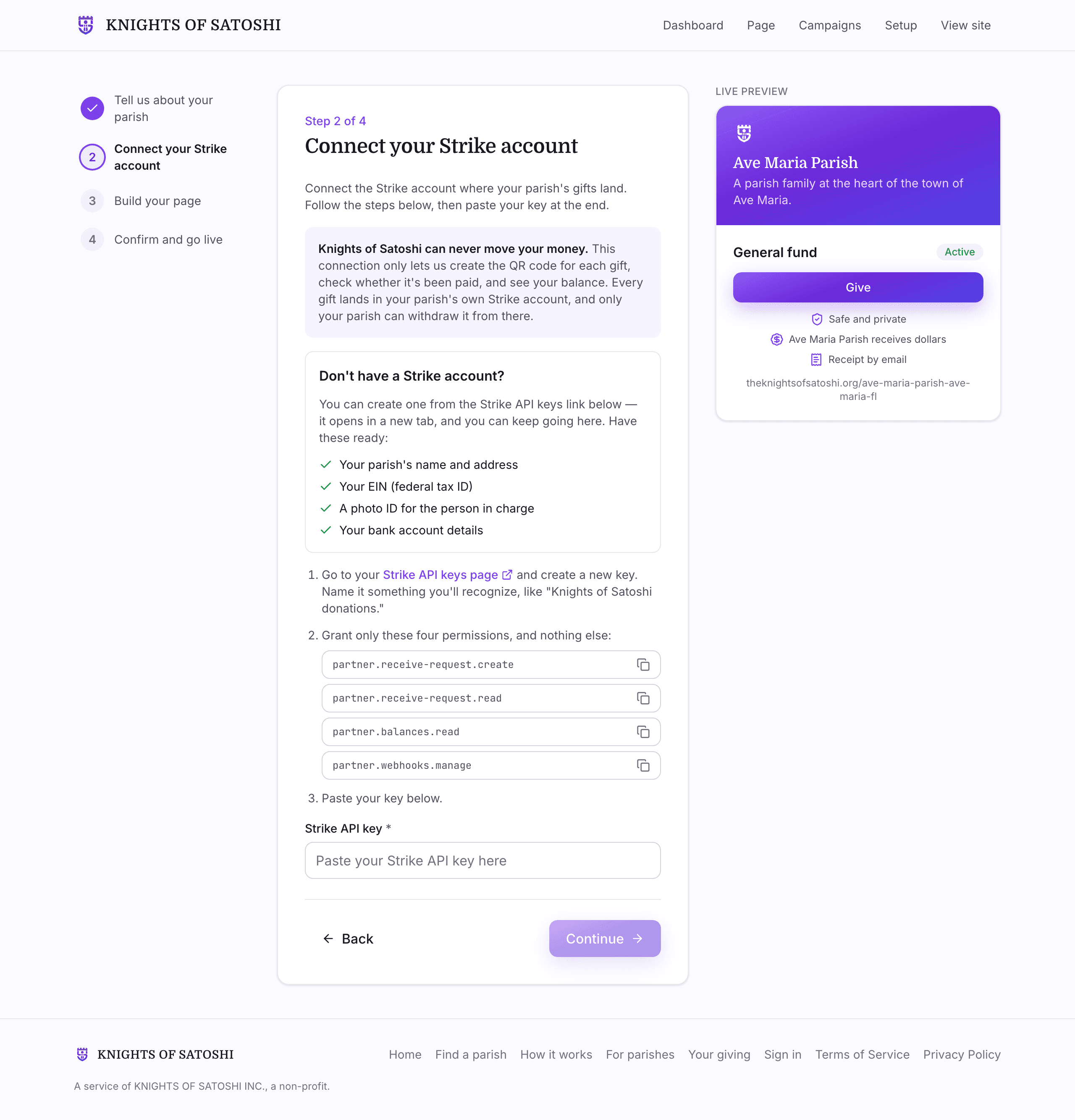
This step is where you connect your parish's Strike account: create a Strike API key and paste it in — Part 3 below walks through exactly how. Every gift then lands in your parish's own Strike account as US dollars. Knights of Satoshi never holds your money, and you withdraw to your bank from Strike whenever you like.
If you do not have a Strike business account yet, this step lists what Strike will ask for so you can create one. Connecting your account is required — you cannot continue until Knights of Satoshi confirms your key works.
Step 3 — Build your page
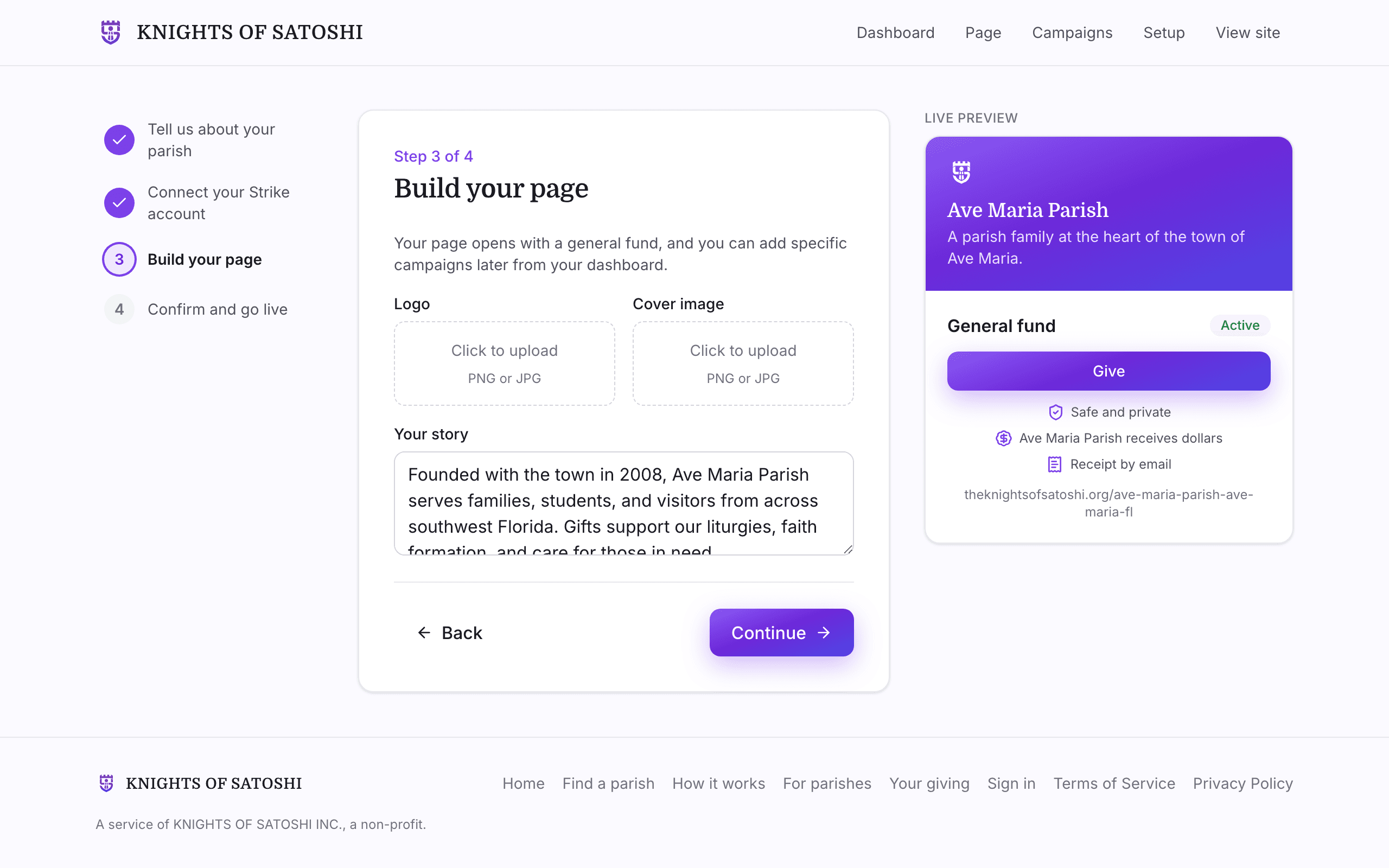
| Field | Required | Notes |
|---|---|---|
| Logo | No | PNG or JPG. |
| Cover image | No | PNG or JPG; the banner on your page. |
| Your story | No | What your parish does, and what gifts support. |
Your page opens with a general fund for gifts of any kind, and you can add specific campaigns from your dashboard later.
Step 4 — Confirm and go live
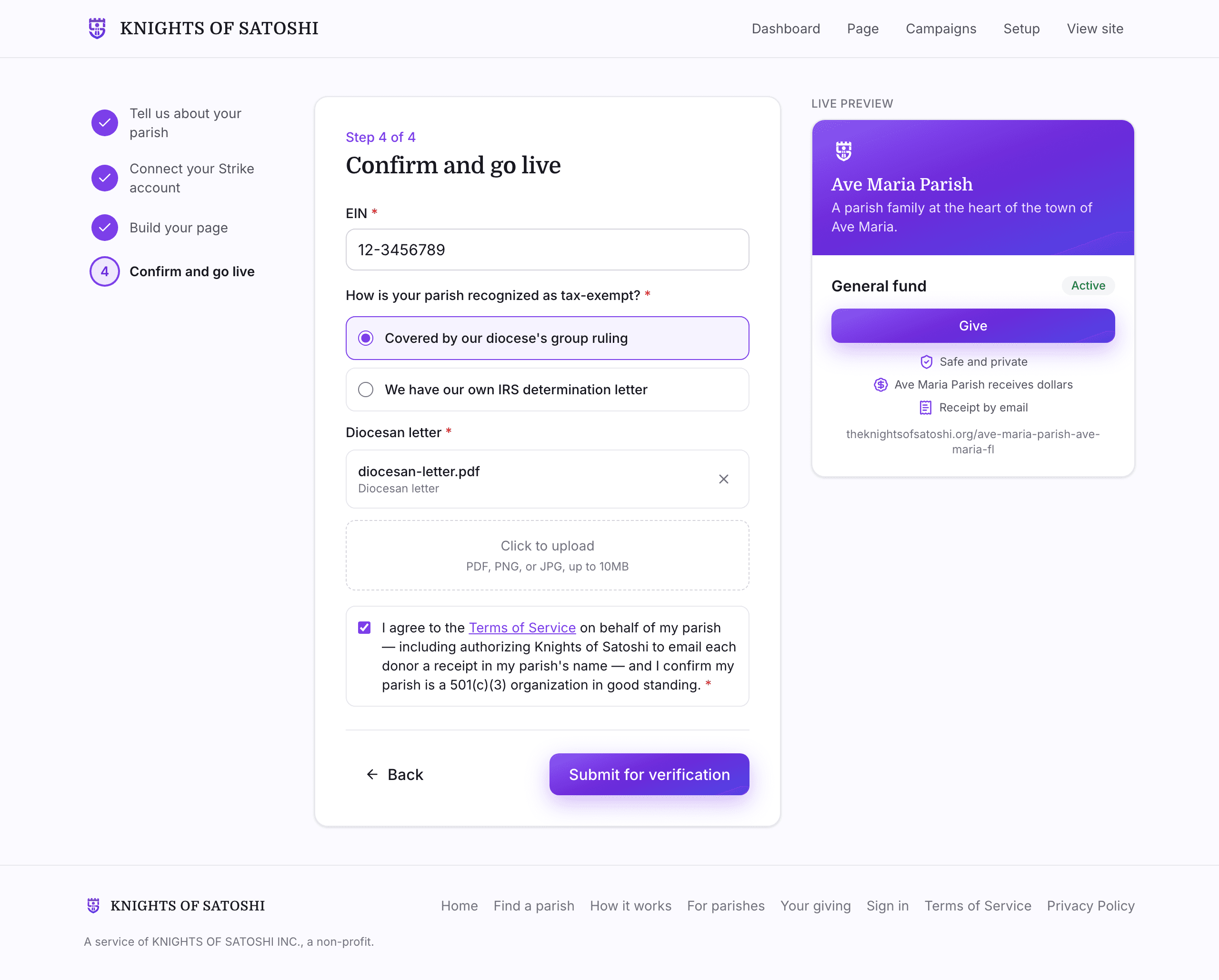
| Field | Required | Notes |
|---|---|---|
| EIN | Yes | Your federal tax ID — used to confirm your parish. Kept private. |
| Verification | Yes | Choose how your organization is tax-exempt. Covered by the group ruling? Upload one diocesan letter confirming good standing and current Official Catholic Directory listing. Have your own IRS determination letter? Upload nothing — Knights of Satoshi confirms your EIN against IRS Tax Exempt Organization Search records before your page goes live. |
| Terms of Service | Yes | One agreement: you accept the Terms on your parish's behalf, authorize Knights of Satoshi to email each donor a receipt in your parish's name, and confirm your parish is a 501(c)(3) in good standing. |
Choosing Submit for verification creates your page and submits it for review. The Knights of Satoshi team confirms your details before your page opens to donors — you can keep editing your page and campaigns from the dashboard in the meantime.
Part 3 — Linking your Strike account
Gifts to your page arrive as US dollars in your parish's own Strike account — donors give Bitcoin, your parish receives dollars, and Knights of Satoshi never holds the money. You connect your account during onboarding by pasting a Strike API key, and Knights of Satoshi confirms it works before you can continue.
Creating a Strike business account
If your parish does not have one yet:
- Sign up on Strike's website as a business. Strike serves organizations in all 50 states, Washington, DC, and Puerto Rico.
- Strike asks for your organization's legal name, address, EIN, and incorporation details. Each person who owns or operates the account confirms their identity with a government photo ID.
- Link your parish's bank account from Strike's dashboard.
Gifts made through Knights of Satoshi arrive as dollars automatically — there is nothing extra to configure.
Connecting it to your giving page
- Go to your Strike API keys page and create a new key. Name it something you'll recognize, like "Knights of Satoshi donations."
- Grant only these four permissions, and nothing else:
partner.receive-request.createpartner.receive-request.readpartner.balances.readpartner.webhooks.manage - Paste the key into the Strike API key field. Knights of Satoshi checks it immediately and tells you if anything needs fixing before you can continue.
From then on, every gift arrives in your Strike balance as dollars. When you are ready to move funds, withdraw to your linked bank from your own Strike dashboard — the withdrawal is always in your hands. Your Knights of Satoshi dashboard shows your balance and reminds you when gifts are ready to move.
If your parish's key ever stops working — for example, if you revoke it inside Strike — gifts pause until you add a new key. Create a new key in Strike, then add it from your dashboard so your page keeps accepting gifts.
Frequently asked questions
- Does Knights of Satoshi hold our donations?
- No. Gifts arrive directly in your parish's own Strike account as dollars. The permissions your parish grants cannot move money — only you can withdraw, from your own Strike dashboard, to your own bank.
- Do we ever hold Bitcoin?
- No. Donors give Bitcoin; your parish receives dollars. Each gift arrives in your Strike account as dollars.
- What do donors see?
- Your page with your campaigns. They give a dollar amount and pay from any Bitcoin wallet; the page confirms when the gift arrives.
- When do donors get receipts?
- Automatically by email once the gift arrives, issued in your parish's name under the authorization your parish grants in the Terms of Service.
- What does this cost?
- Knights of Satoshi charges no fees. Your parish's Strike account is governed by Strike's own terms.